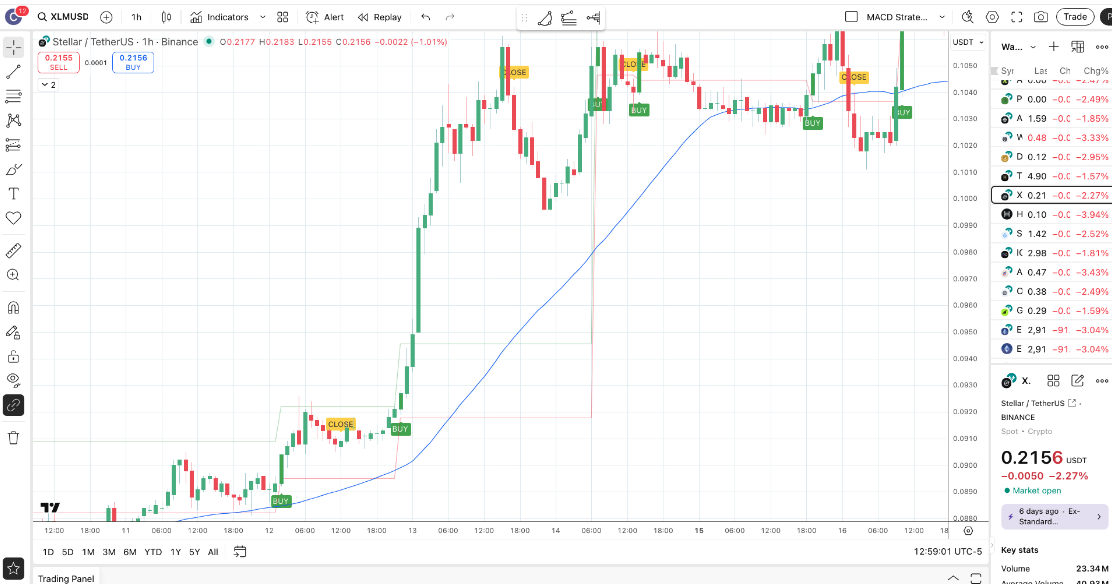
The ITS-E Pine Script plotted on TradingView — BUY, SELL, and CLOSE signals overlaid on price.
A custom Pine Script that automates the Intraday Trend System's BUY, SELL, and CLOSE signal logic. Install it on TradingView in minutes. Set alerts. Execute your system without second-guessing.
The ITS-E Pine Script plotted on TradingView — BUY, SELL, and CLOSE signals overlaid on price.
The ITS-E Pine Script is available exclusively to Crypto School members at just $49/month. You get the script, the full installation and configuration course, the Intraday Trend System course, technical indicators training, weekly market updates, and an active trading community.
Join Crypto School — just $49/month →Full Course
10 lessons across 4 sections — plus Pine Script source
Learning Outcomes
How the ITS-E script detects BUY, SELL, and CLOSE conditions using MACD and trend filters
Step-by-step installation on TradingView — works on any device
How to configure the indicator settings to match your trading timeframe and risk tolerance
Alert setup for both desktop and mobile so you never miss a trade signal
The ITS-E Pine Script and course are inside Crypto School. Just $49/month. All courses included. Cancel any time.
Join Crypto School — just $49/month →FAQ
What is the ITS-E Pine Script?
The ITS-E (Intraday Trend Executor) is a custom TradingView Pine Script built by Brian Longest to automate the signal logic of the Intraday Trend System. It plots BUY, SELL, and CLOSE signals directly on your chart and can fire mobile alerts so you never miss an entry.
Do I need coding knowledge to use ITS-E?
No. The ITS-E course teaches you exactly how to add the script to TradingView, configure the settings, and set up alerts — step by step. You do not need to know Pine Script or programming to use it.
What TradingView plan do I need for ITS-E?
You need at least a TradingView Basic (free) plan to add the script, but alerts require a TradingView Essential plan or higher. The course covers how to set up both desktop and mobile alerts.
Is the ITS-E script available outside Crypto School?
No. The ITS-E Pine Script (v1.0) is an exclusive Crypto School resource. It is provided to members as part of the $49/month subscription, along with the full Intraday Trend System and Technical Indicators courses.